
Web Articles System Review Support
2019/02/22
What functions are really necessary for a groupware system?
Groupware systems have a history of more than 20 years since their appearance.
In recent years, groupware for small and medium-sized companies as well as for large companies and groupware specialized for specific functions have been created, and there are a wide variety of types of groupware. Among them, it is not easy to determine which groupware system best fits your company and what functions you should choose.
How do you decide which functions and products are best suited to your company's objectives when considering a groupware system? How do we select the right system?"
To answer these questions, we will first introduce a group of typical functions offered in a groupware system.
Then, we will explain the importance of selecting the right functionality for your company and what is most important in terms of the functionality of a groupware system.

Table of Contents
Typical Examples of Groupware System Functions
Groupware systems generally provide the following standard functions.
| Functions to promote information and communication | |
|---|---|
| E-mail / Message function | Functions that can be sent, received, and viewed on the groupware, independent of the terminal. |
| Message Board | This function allows you to post messages and notices. It can also be used for internal publicity. |
| Memo | Unlike the memo function on a PC, this function can be used as a memo pad, and can be checked and used while away from the office or from another device. |
| Status of attendance display functionality | This function allows you to check whether or not employees are using the Groupware. |
| In-house SNS | This is an in-house SNS function for casual communication. Group chat function allows users to send and receive messages by group or project. |
| Functions to promote information sharing within the organization | |
|---|---|
| File sharing function | This function allows users to circulate messages and information and submit reports. Circulation status can also be checked. |
| Circulation / Reporting | If you are in charge of multiple steps at the same time after forking, you can approve them all at once. |
| Address Book | This function shares contact information by group or project. Information can also be searched. |
| Web (electronic) meeting function | This function allows information sharing and exchange of opinions by theme. It can also be used to share ideas and knowledge. |
| Minutes function | Minutes can be created and shared with participants. |
| Project / Task Management | This function allows you to manage tasks and share project progress. |
| Questionnaire | This function allows users to create, distribute, and tally answer sheets. |
| Functions to improve business efficiency | |
|---|---|
| Workflow | This function allows you to digitize various types of applications. This function enables paperless in-house applications. |
| Expense Reimbursement | This function allows you to apply for temporary reimbursement of transportation and accommodation expenses. |
| Schedule Management | This function allows you to share and check schedules of individuals and groups. |
| Full-text search | This function allows users to search for necessary information from a large amount of mixed documents and materials. |
| Links | Register links to frequently used pages. |
| Facility Reservation / Meeting Room Reservation | Manage facility and equipment reservations such as meeting rooms and projectors. |
| To-Do List | This function allows you to make a list of tasks to be done, prioritize them, and manage their progress. |
| Daily Report | Daily reports allow you to report on your daily business activities. |
| Other functions | |
|---|---|
| Portal screen | This is the entrance to the groupware. It consolidates major information and provides seamless access to information. |
| Operation management function | This function manages the addition and deletion of members and the creation of groups. Security functions such as access rights are also provided. |
| Mobile | Groupware can be used from mobile devices, enabling operations regardless of location and time. |
As you can see, groupware systems have a wide variety of functions.
On the other hand, there are many cases in which it is difficult for employees to grasp and use all of the functions, and it is not always easy for employees in the field to understand and use the system.
In order to maximize the benefits of a groupware system, it is important to carefully select the necessary and unnecessary functions at the system introduction stage, and to consider operations that suit your business.
Importance of sorting out the functions of a groupware system

When considering the introduction of a groupware system, it is most important to select the functions that are truly necessary.
If there are a huge number of unnecessary functions, it will be difficult to use and may cause unnecessary costs and even be counterproductive.
One of the most common failures of groupware system implementation is that the use of the groupware system did not spread within the company.
Employees who are accustomed to the traditional way of doing business are still reluctant to move to a new way of doing business that uses a new system and functions.
Once the system is introduced, it is important that the employees feel the benefits of the system and realize how easy it is to use.
What is essential for this is to clarify the purpose of introducing a groupware system and the results it will bring. In order to set more concrete objectives and results, it is effective to interview employees in the field. It is important to accurately grasp the work conditions of the employees who will actually use the system, and to select effective functions for them.
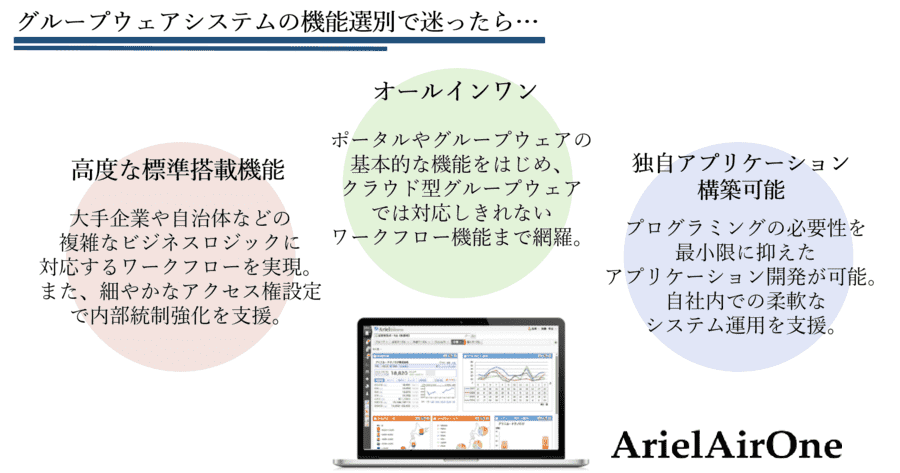
If you are not sure about the functionality of a groupware system...
Considering necessary functions of a groupware system from the viewpoint of the purpose of implementation
As mentioned above, groupware systems have a wide variety of functions, and there are many ways to select them, but the purposes of introducing a groupware system can be broadly classified into three patterns.
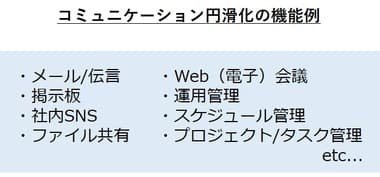
Objective 1: To facilitate communication within the company
Communication within a company can be within the same department, between other offices (branch offices, etc.), or across the entire company at once.
Also, the situation differs depending on the information to be shared, such as "I want a quick reply," "I want to be reminded for a certain period of time," "I want to check the documents," and so on.
For these needs, a groupware system integrates a variety of communication methods such as message functions, bulletin boards, and file sharing, making it possible to share information in the most appropriate way.
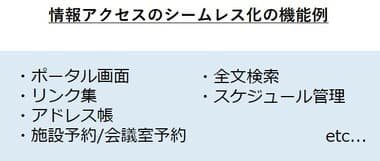
Objective 2. to make access to information seamless
In daily work, there are many opportunities to access various types of information.
Accessing past documents, e-mails, meeting schedules, and other information in different ways is tedious and time-consuming.
With a groupware system, it is possible to complete all of this information within the system by using a portal screen.
Since the lead to information can be consolidated on a single page, a significant reduction in man-hours can be expected. In addition, if the groupware system is compatible with smartphones and tablets, it can be easily accessed from outside the office or on a business trip.
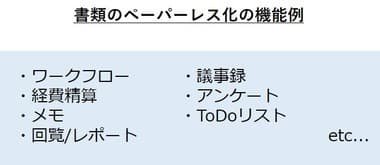
Objective.3. To make documents paperless
Problems that are often cited with paper-based document management include printing costs and document storage. In particular, important documents such as payment documents, various applications, and contracts require close attention to security.
By using a groupware system, these documents can be digitized, reducing not only printing costs but also the time and effort required to store and organize documents.
Another major advantage is that each document can be password-protected if it is in data format, and the documents can be searched in the system for quick access to the documents you want to check. In addition, accessibility at any time and any place makes it possible to smoothly approve applications and other documents.
Separation of information" and "linkage with other systems" are essential for the basic functions of a groupware system.

We have provided examples of what role the functions of a groupware system play and the benefits they provide for each purpose.
Then, regardless of the purpose for which a groupware system is implemented, there are two points that should be emphasized in order to maximize the benefits that it brings to the business.
(1) Separation of information
The first is whether "separation of information" is sufficient.
It is important that the appropriate people can access information in an optimal manner in their daily work. Even if information is centralized, if this separation of information is not done properly, there will be an overflow of information that is not necessary, making it difficult to access, or revealing information that should not be visible.
Ideally, any information sharing should be in an optimal form and in a state where it can be accessed quickly.
The functions required of a groupware system vary depending on the purpose, but it is important to consider whether the product and its functions can realize the type of information sharing you are aiming for, in other words, whether it can adequately separate a wide range of information.
(2) Cooperativity with other systems
The second point is "cooperativity with other systems.
Although many benefits can be obtained by using a groupware system by itself, even greater benefits can be expected by linking it with the data of an existing system.
For example, by linking with personnel information, it is no longer necessary to update employee information on the Groupware system, and the gaps in information can be minimized.
Also, by linking with sales data, etc. and displaying it on the portal screen, it is possible to easily share the latest daily data.
In this way, flexibility in linking with other systems is very important to maximize the strength of the groupware system of "centralization of information" and to improve the efficiency of the entire business.
In order to select the right product for your company, you should be sure to check whether or not the system can flexibly support integration with existing systems.
In sum, it can be said that the most important factors in selecting a groupware system are to select functions that meet your objectives, and to pay attention to whether or not the system can adequately separate information and whether or not it can flexibly integrate with other systems.
Points to consider when choosing the right groupware system for your company
- Identify current operations and issues. Interviewing on-site employees is also effective.
- Consider the new business flow and determine the functional requirements for the groupware system.
-
Consider whether the information to be centralized can be sufficiently separated.
-
Confirm whether or not the system can be linked with the existing system.
With the above four points in mind, let's introduce a groupware system that is suitable for your company.
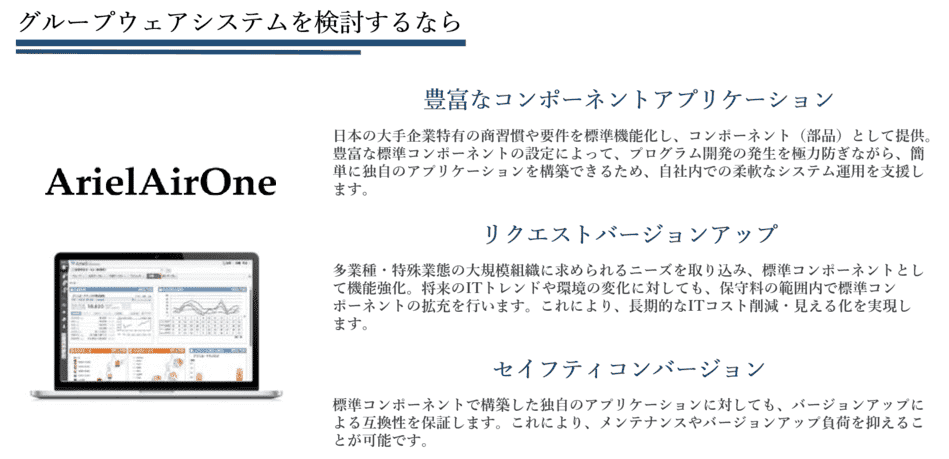
If you are considering a groupware system
Related Useful Information
Video
2026/02/16
ArielAirOne Product Introduction Seminar

Video
Jan 30, 2026
The First Steps of University DX: Learning from Oberlin College

Video
2025/12/19
How to create a system that enables information to reach the entire company.

Related Case Studies
Paper applications have been reduced to almost zero, and an information sharing infrastructure has been built with Ariel at its core.
Art Nature Co.

Increased business speed with ArielAirOne for more than 10 years
Exing Corporation

ArielAirOne's Flexibility Improves Operational Efficiency after Migration to Notes
Water Supply Company A