
Groupware / ArielAirOne / Development Platform
Gunze Corporation
Strengthening core technologies, improving business efficiency and information utilization - Case study of migration from Notes to ArielAirOne

GUNZE LIMITED ("GUNZE") has three businesses: Apparel, Functional Solutions, and Life Creation, and is committed to developing products with superior functionality and added value in a wide range of fields through the development of proprietary technologies. Through each of these products and services, we provide "comfort" to as many customers as possible.
We have continued to change and take on challenges, with our founding spirit of "Respect for People," "Production of Quality Products," and "Coexistence and Co-Prosperity" as the warp, and business development tailored to the needs of the times as the weft. We have a strong will to contribute to society by providing "pleasant products and services" to our customers and "products and services that contribute to the improvement of people's quality of life," and are committed to enhancing customer satisfaction and corporate value as "a company that is needed by society" and "a company that develops sustainably with society. GUNZE is working to improve customer satisfaction and corporate value as "a company that is needed by society" and "a company that develops sustainably with society.
In 2017, GUNZE migrated from Notes, which it had used for 20 years, to ArielAirOne ("Ariel"). From its introduction to the present, GUNZE has been working on continuous improvement using Ariel.
In this interview, we asked Mr. Shinji Tsurumi, Manager of IT Strategy Office, Technology Development Department, about the background of migration to Notes and introduction of Ariel, how to proceed, innovations, and effects.
This article has been edited based on the session "Secrets of Successful Notes Migration Learned from Case Studies" at "Works Way 2021 - Cornerstone x Transformation: Accelerating DX in the Next Normal Era" (hosted by Works Applications Group).
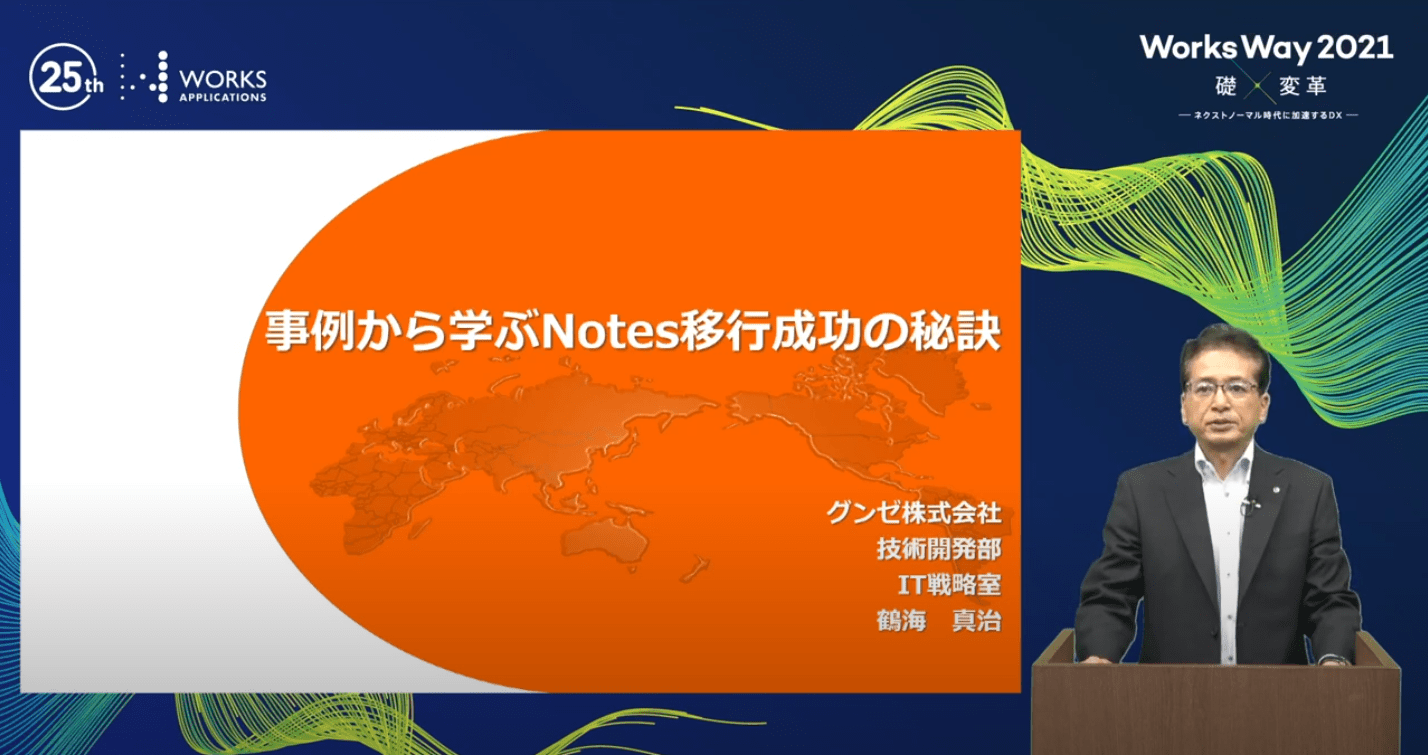
Interview participant:
Mr. Shinji Tsurumi (Manager, IT Strategy Office, Technology Development Department)
Background of Notes Migration and Ariel Introduction
In 2016, we considered migrating to Notes due to many requests for work style reform at the business manager hearing. 20 years of Notes use had continued, but the groupware market was shifting to the cloud, and as of 2017, Notes' market share was less than 14%, with no prospects for its technological future. The fact that Notes' market share was less than 14% as of 2017 and its technical future was not promising was also a cause for concern.
In addition, from the user's perspective, the remote access mechanism of Notes was difficult to use overseas due to its high communication volume and slow processing, it did not support access from smart devices, and data exchange with clients was limited to 7 MB.
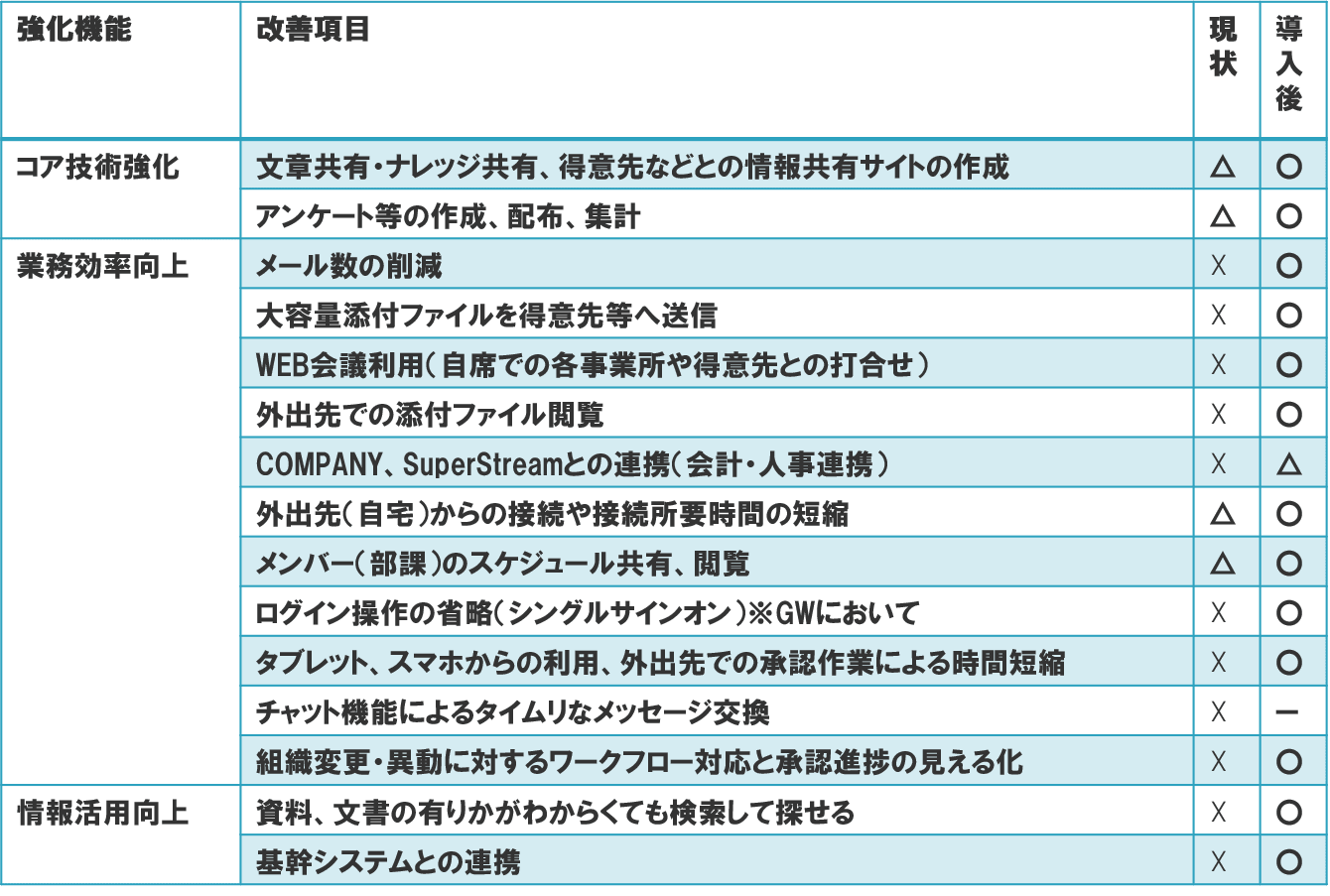
Given these circumstances, we decided to migrate from Notes to Ariel from the perspective of functions and costs to "strengthen core technologies," "improve operational efficiency," and "improve information utilization.
Reasons for selection of Ariel
In making the selection, we first considered the following: 1.
1. Product selection
・Select the best combination of product evaluation and cost in terms of functions by category
・Get permission from the manufacturer to use the application to evaluate the product in an actual environment
2. Configuration selection
・Determine the best configuration to ensure security while improving convenience
3. Usage selection
・Determine how to use the application on PCs and smart devices
We decided on Ariel as the main product group because Notes consists of three components: e-mail, workflow, and document management, and we needed a product that could be used in the cloud and that had security-enhancing functions. After deciding on the products, we took convenience into consideration.
After deciding on the products, we decided on a configuration that would ensure security while taking convenience into consideration, and we also decided on how to use the products on PCs and smart devices.
How to proceed with the introduction project
After careful consideration, the decision was made to migrate in four years. We then divided the entire project into five processes and drew up a project policy.
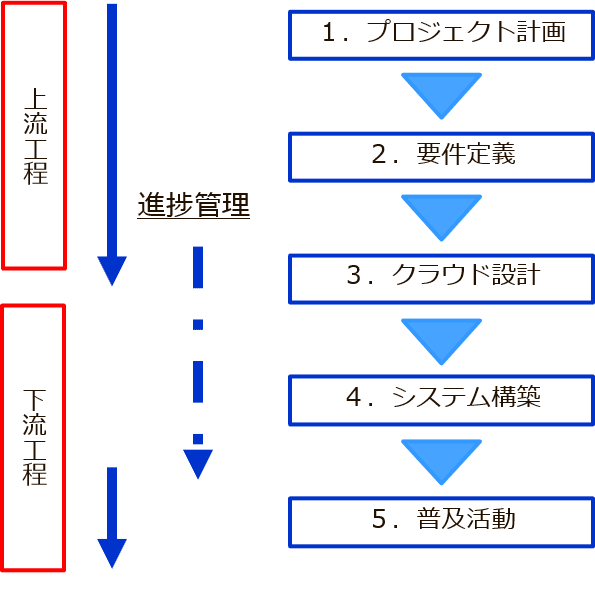
The first is the "project planning phase," where the schedule, quality control, meeting bodies, and deliverables are drawn up. Specific things to be done in each process were identified and put into a WBS.
The second is the "Requirements Definition Phase," in which a realistic solution is explored and defined based on specific issues and future directions. What could be decided on the spot was decided, and what would be considered at a later date was clarified as issues.
The third is the "Cloud Design Phase," where the look and feel of the system is designed considering the circumstances of the cloud. Here, we organized the flow of login authentication considering convenience and security.
The fourth is the "system construction phase," which is dedicated to progress and quality control and eliminating bottlenecks. We verified the output and extracted defective items. After clarifying the measures to be taken and the responsibilities, we prioritized them and carried out delivery and quality control. Since the transition will be a 4-year plan in terms of volume, we examined and decided how to make the old and new coexist.
Fifth, in the "dissemination phase," we enhanced the operation manuals and on-site explanations to ensure a smooth start-up. A manual creation plan was developed, and manuals and digest versions were created for each.
Effects of Introduction
First, before the project started, we discarded unnecessary DBs in the migration process, and through consolidation by unifying DB designs, we were able to reduce the volume by about 1/3, from 1300 DBs to 466 DBs, which significantly improved maintainability.
As a result, we were able to achieve most of the functions that we had identified in the "core technology enhancement," "improvement of operational efficiency," and "improvement of information utilization" issues. For example, members are able to share and view their schedules, and use the system from tablets and smartphones to save time by approving documents when they are out of the office.
There were four good points and four success points in selecting Ariel, as follows.
Good points for selecting Ariel:
1. It is compatible with Notes and can be used concurrently
2. Although it changes from a cloud server to the Web, it is similar to Notes in terms of sensation, so there is less confusion in the user department
3. Works' cloud service can take care of the operational hassles
* AWS environment Points to keep in mind in the AWS environment, backup, version upgrade, adding capacity, etc.
4. Since we had renewed the groupware including Ariel, we were able to cope with the drastically changing environment due to the Corona disaster
Success Points
1. Close communication with the user department and incorporate their requests to some extent
2. 2. It is best to migrate from the most frequently used applications, but exclude those that are not suited for Ariel.
3. When it comes to migration, never migrate unnecessary data.
4. Use @SUPPORT (support service) provided by Works, Inc.
Among the various functions of Ariel, those that are particularly popular within the company
The first is the company-wide portal screen. The first is the company-wide portal screen, where the Corporate Communications Department constantly provides up-to-date information. Menus and manuals have also been consolidated and established as the main screen, and the consolidation and sharing of information has progressed.
The second is a weekly report application. Previously, information was entered via PC and company regulations, but now it can be entered via smartphone as well, allowing for use on the go and during travel time, leading to a change in work style and faster sharing.
The third is a system development request application. Previously, data was generated vertically stacked according to the progress of each project, so we had to check the progress of each project one by one. In addition, RPA was used to link with invoices to improve operational efficiency.
Finally.
Through the use of Ariel, we aim to reform the way of working by developing a system for sharing information regardless of the location of the central office, satellite office, or home, and by allowing employees to freely choose where they work depending on the situation. As part of this, we plan to prepare a general-purpose workflow tool in Ariel to achieve de-hankoning.
Related Case Studies
Paper applications have been reduced to almost zero, and an information sharing infrastructure has been built with Ariel at its core.
Art Nature Co.

Increased business speed with ArielAirOne for more than 10 years
Exing Corporation

ArielAirOne's Flexibility Improves Operational Efficiency after Migration to Notes
Water Supply Company A