
Web Articles System Review Support
2019/06/14
3 points to check when sorting workflow system functions

Table of Contents
Functions of a workflow system
Workflow systems generally include the following functions.
| Functions and terms used in the application stage | |
|---|---|
| Progress status check | Checking the progress of a request for approval |
| Withdraw | The applicant withdraws a request for approval by himself/herself before the request is approved. |
| Duplicate | Duplicate a previously created request and edit it to reuse it |
| Edit/reuse setting | Set whether or not editing is allowed while a request for approval is in progress. |
| Functions and terms used in the approval stage | |
|---|---|
| Automatic approval | Approve automatically if certain conditions are met |
| Simultaneous approval | If you are in charge of multiple steps at the same time after forking, you can approve them all at once. |
| Proxy approval | Grant authority to other users to approve applications on behalf of the person in charge |
| Rejection | Disapprove the application based on the contents of the application |
| Send back | Send the application back to the applicant to correct the contents. |
| Change the person in charge | Change the person in charge of approving the application |
| Signature | Display an arbitrary image or auto-generated impression |
| Functions and terms used at any stage | |
|---|---|
| Comment | Enter comments from the person in charge on the application form. |
| Review | Request a supervisor or other person to review the document before starting the application |
| Notification | Notify the person in charge when the information (contents and flow) of the application is updated. |
| Confirmation of Changes | Request the person in charge to take some action on the application |
| File Attachment | Attach a file to the application form |
| Assign to Contact Person | Designate the next person in charge of an application form |
| Mobile | Create, submit, and approve applications on a mobile device |
| Functions and terms used in management | |
|---|---|
| Data output | Output application form data in a certain format (CSV, print, PDF, etc.) |
| Supervision | One of the most common workflow patterns, passing from one person to another |
| Step | Notify the person in charge when the information (contents and flow) of the application is updated. |
| Fork | One of the workflow patterns, dividing the approval task from one person to multiple people |
| Merge | A workflow pattern that merges the forked flows into a single flow. |
| Conditional Split | A workflow pattern that changes the destination flow according to certain conditions. |
| Transition Condition | Set conditions that must be met in order for the flow to proceed (e.g., transition occurs when one person executes the flow, transition does not occur until all members execute the flow, transition occurs when 0 of the members approve the flow) |
| Language settings | Set the language of the workflow system itself |
| Linking to other systems | Integrate with systems other than the workflow system |
| Design screen | Screen for designing the workflow itself *The higher the visibility, the easier it is to design, which is especially important for workflow systems. |
As you can see, workflow systems offer a wide variety of functions.
On the other hand, it is difficult, nor is it necessary, to understand and use all of the features. What is important is the rate of compatibility with your company's operations. Function selection is an extremely important point in order to increase that compatibility.
So, what points should you pay attention to when selecting the functions of a workflow system?
Points to keep in mind when selecting the functions of a workflow system
When selecting the functions of a workflow system, the following points should be considered
1. understanding of company rules
In order to adopt the appropriate functionality from among the many workflow functions, it is necessary to first confirm the company's internal rules. Internal rules refer to "all the processes to be followed when approving a request within the company. For example, taking the "approval" process as an example, the method of receiving the accompanying "rooting around" and "review" varies greatly from company to company. The "review" by the supervisor and coworkers prior to the application is not recorded in the approval document itself. However, if they are not recognized as part of the business, there is a risk that the effectiveness of the system introduction will be halved.
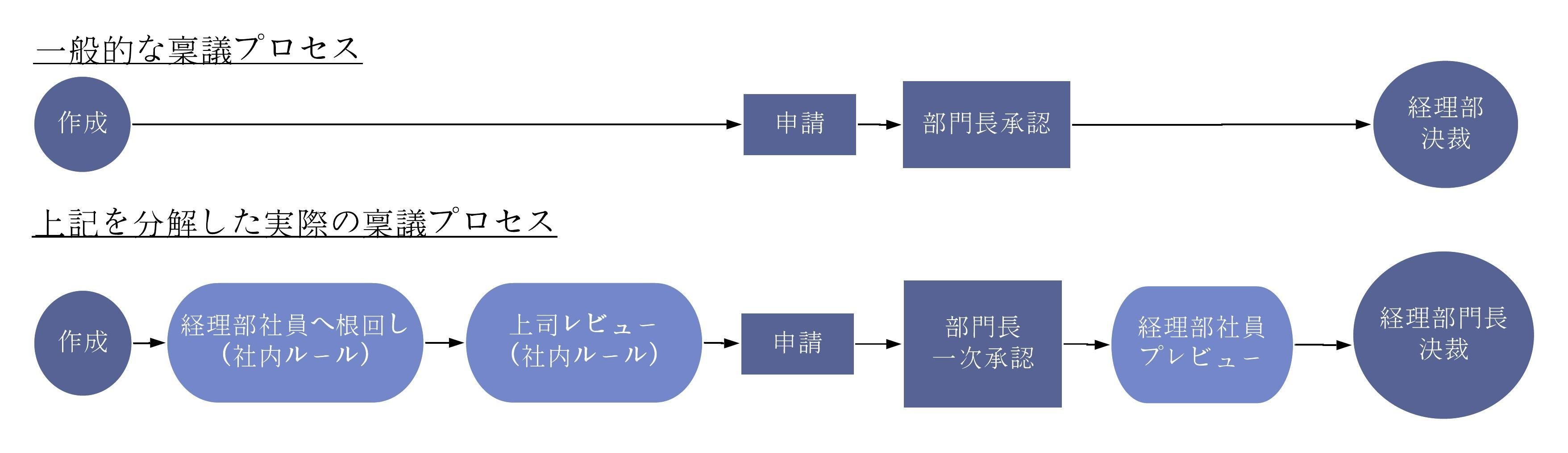
When checking internal rules, it is important to break down the steps in detail for each action that occurs for a single workflow.
A typical approval process is expressed as
"Create➞Apply➞Department head approval➞Control department approval"
, which can be broken down as follows, for example.
'Create ➞Root to accounting department employee (internal rule) ➞Manager review (internal rule) ➞Apply ➞Department head primary approval➞Accounting department employee preview➞Advance by accounting department head'
The process of breaking down the approval flow as individual steps is very helpful in selecting the functions that are needed.
2. compatibility with the way of working and the way of work
The style and culture of how work is done varies from company to company. The way approval work is done and the positioning of the workflow system is greatly influenced by this.
For example, are there any circumstances that should be taken into consideration, such as some positions tend to be out of the office, remote work is allowed, or managers often travel overseas? Depending on these circumstances, the workflow system may need to be equipped with features such as mobile access and access from outside the company network. To ensure smooth approval operations, it is important to properly understand how employees work and what they do.
Working styles may vary from job to job. For example, there are cases where "only employees raising children are allowed to work remotely. The selection of a system should take into account the working style of such exceptional employees. Failure to accommodate irregular work styles will result in more work to be processed outside of the system each time, resulting in more manual work, which will not produce the efficiency gains originally hoped for.
Signature methods also vary from company to company. Without determining whether the workflow system has functions that can accommodate detailed work styles, such as whether to write a signature or leave a seal impression, it cannot be said that the system has selected the appropriate functions. In a workflow system where "approval" is the main purpose of business, it is important to check how signatures can be performed.
3. compatibility with the system to be linked and the system from which the system is linked
Compatibility with the system already in operation is also a point that must be checked.
Check how the system will work with the systems already in use and the range of data that can be linked.
A common linkage method is to output data from the parent system in CSV or XML file format and import them on the workflow system side. If you want to automate data linkage, check whether more advanced linkage is possible.
If you adopt a workflow system that is not compatible with your existing system, you risk incurring very large costs at the time of introduction, as well as detrimental to operational efficiency during operation.
Summary
The above is an explanation of the functions of workflow systems and how to select one.
However, if the necessary functions are not properly identified, there is a risk that the system itself will not be utilized due to incompatibility with the business, and the conventional inefficient business practices will continue.
In order to avoid such a situation, first of all, thoroughly check the company's internal rules, work style, and linked systems.
Related Useful Information
White Paper
2024/12/16
HUE Workflow Case Studies
White Paper
2022/03/31
Key Points for Selecting a Workflow System
White Paper
2022/03/10
Guide to Switching from Paper

Related Case Studies
Easy-to-use design and full functions were decisive factors in the decision to introduce HUE. What is the appeal of HUE workflow that customers are experiencing?
Nakamura Sangyo Gakuen School Corporation Kyushu Sangyo University

HUE workflow strengthens control and improves efficiency in preparation for IPO
Acall Corporation