Groupware / Development Platform / ArielAirOne
K.M.U. Corporation
The Secret to Success in Migrating to Notes: ArielAirOne Standardizes and Streamlines Operations
Keimyu Corporation (hereafter referred to as "Keimyu") is Japan's only manufacturer of exterior building materials, offering a comprehensive range of products including roofing materials, exterior wall materials, and rain gutters. Under the slogan of "Protecting Lifestyles, Making Homes More Attractive," the company has contributed to the improvement of Japan's living environment by providing Products/Services that utilize its proprietary technologies, such as improving the earthquake resistance of buildings with lightweight roofing and exterior wall materials, and enhancing the beauty and longevity of buildings with inorganic coating and photocatalytic technologies.
Amid the drastic changes in society, we focus on four social issues: safety and security, beauty and longevity, craftsman shortage, and environmental issues, and work to create new value through product and technological innovations to solve these issues. Furthermore, we are boldly taking on the challenge of expanding our social contribution from Japan to the rest of the world, not only in the domestic detached housing market, but also in new markets such as non-housing and overseas markets.
K.M.C. migrated from Notes to ArielAirOne (Ariel) in 2020. From the introduction to the present, we have been working on continuous improvement using Ariel.
In this interview, we asked Mr. Tadaharu Ishimura, Executive Officer in charge of IT and Logistics, about the background of the migration to Notes and the introduction of Ariel, how it was carried out, and its innovations and effects.
This article has been edited based on the session "Secrets of Successful Notes Migration Learned from Case Studies" at "Works Way 2021 - Cornerstone x Transformation: Accelerating DX in the Next Normal Era" (hosted by Works Applications Group).
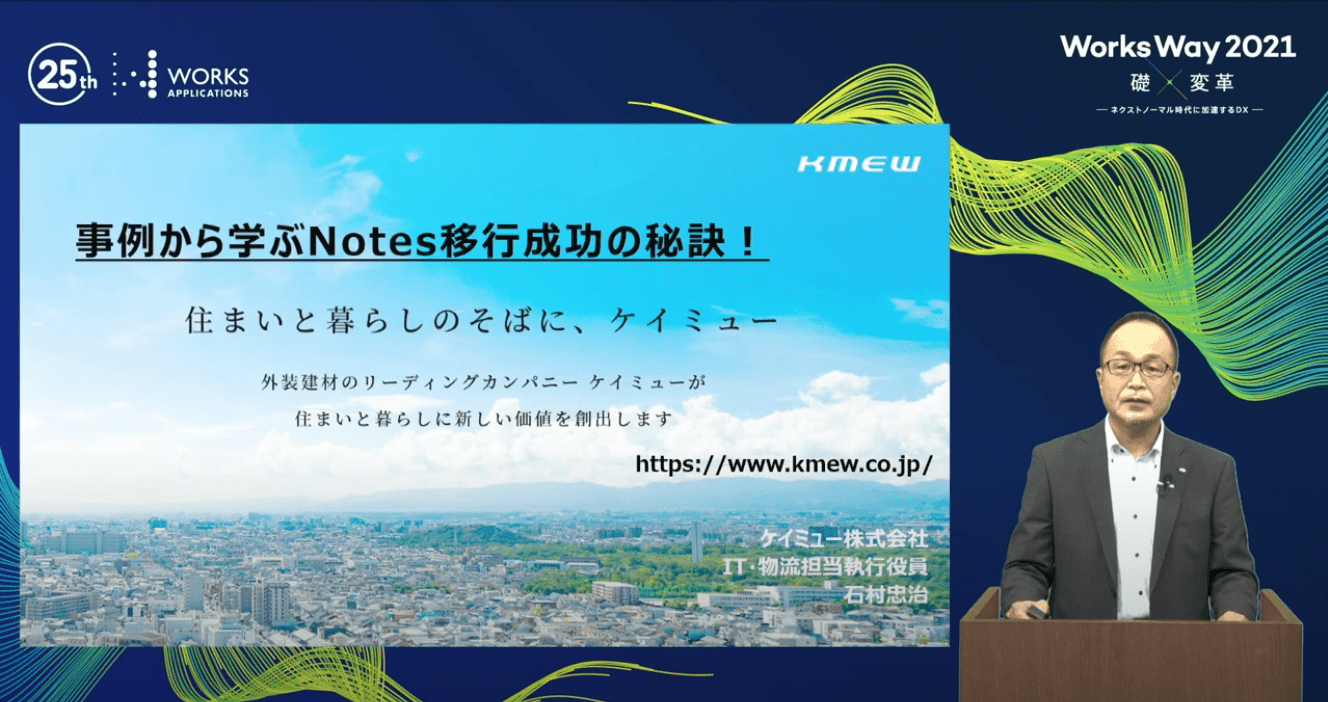
Interview participant:
Mr. Tadaharu Ishimura (Executive Officer in charge of IT and Logistics)
Background of Notes Migration and Ariel Introduction
In 2017, the Panasonic Group decided to discontinue the use of Notes, and we discussed the replacement of the system. However, we had been dissatisfied with the Notes functionality for some time, such as the inability to convert to the Web and the lack of flexible scalability. To give a concrete example, for example, there were complaints that it was difficult to create an electronic application workflow, that only a few people in charge could create it, and that it was troublesome to maintain a workflow that had been created by someone else in the past.
Reasons for selection of Ariel
We decided to rebuild the internal portal and compared five different products. In the end, we chose Ariel for the following five reasons. 1.
1. migration tool from Notes enables migration of BBS "in a short time"
2. introduction and operation cost
3. wide range and simplicity of being able to build and maintain by ourselves
4. possibility to link organization and people information from HR system
5. possibility to use smart phones
How to proceed with the introduction project
We divided the start date of operation and migration method by system.
Portal was migrated in advance" → "Mail was migrated by department" → "Bulletin boards (about 100) were migrated by bulletin board" → "Workflow was migrated from new applications"
In this way, we migrated in the most appropriate way for each system.
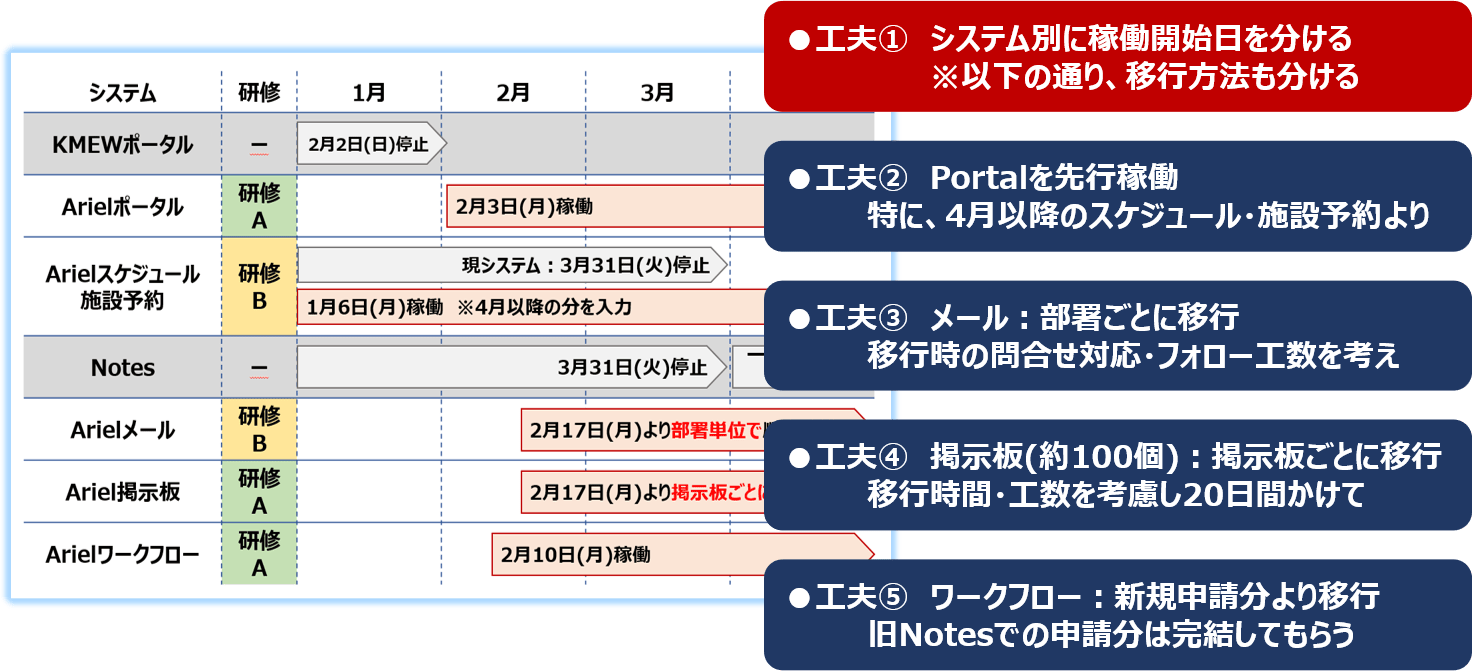
We also set a deadline for Notes use, and based on that deadline, we focused on short-term construction. The following four concrete measures were taken to achieve this goal.
1. Set a schedule working backward from the goal:
2. Make decisions early by giving authority to the PM:
3. Thoroughly discuss and decide in the review phase, and do not go back:
4. Because of the high degree of freedom, there were approximately 100 bulletin board formats in Notes, but we consolidated them into two based on Ariel's functionality. Browsing restrictions are also implemented per BBS unit, rather than per BBS category. In addition, to reduce data migration work, the transfer to Ariel is limited to bulletin boards only. The remaining data such as emails, workflow, schedules/facility reservations, etc. are stored locally by employees or separately in the Systems Department.
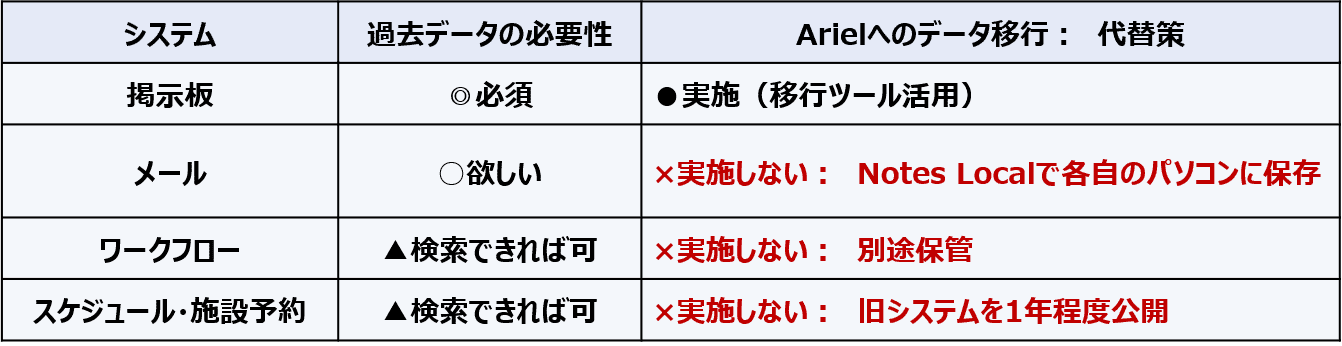
In-house Spread of the System Migration
Using videoconferencing, training for all employees was conducted approximately 10 times each, with the content divided into two parts. In addition, "Ariel key persons" were set up in each department and asked to collect questions using group e-mails. In addition, we added a twist by preparing FAQs for Ariel, so that the field staff could resolve their questions on their own.
Effects of the introduction of Ariel
The best part was that we were able to "standardize and streamline operations" in accordance with Ariel's style.
The first detail was the creation of a clean portal.
The design department was also involved, and screens, including those for smartphones, were created so that unread items would be highlighted in red. With the distribution of smartphones to all employees for business use, a new culture is taking root in which employees always look at the portal when Ariel is in operation.
The second is the bulletin board.
There are about 100 types of bulletin boards, and while there were many patterns in Notes, we have been able to consolidate them into two patterns in Ariel. This has drastically reduced the time and effort required for maintenance. The ability to send message notifications directly from the bulletin board is also very useful.
The third is workflow.
Notes had a master for each workflow, which made maintenance complicated when employees were transferred. However, with Ariel, the workflow approver master is centralized in a common workflow. Each field can be configured and programmed, and complex screens can be created. The screen design and approval route creation screens are visual and easy to understand, and operation is simple enough that even beginners can handle it.
The fourth is workgroups.
There are approximately 150 workgroups, and you can create and use the groups you need for sending out e-mails and messages. Meeting schedule registration and bulletin board viewing privileges can also be freely set, which is convenient when changing members.
The fifth is smartphone use.
All Ariel functions are included in the smartphone, which is very useful for workflow approval, etc., even outside the company.
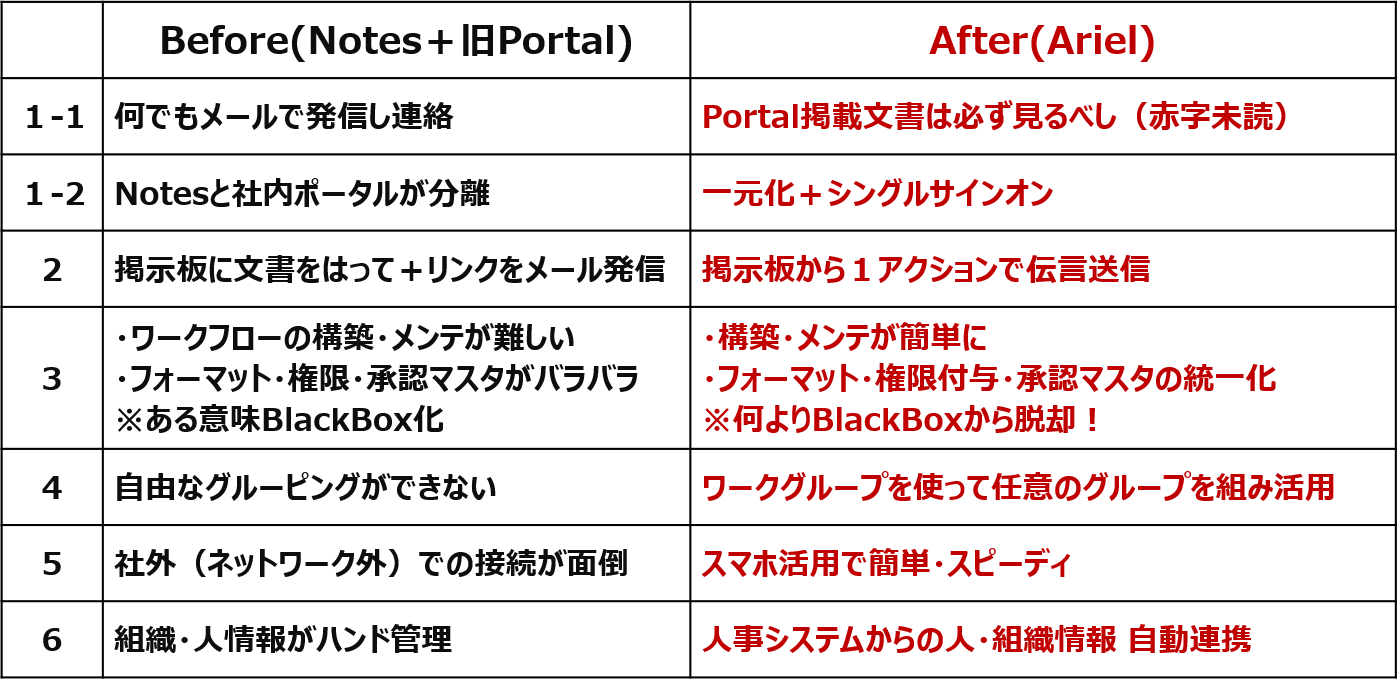
Ariel's various functions that have been particularly well received within the company
The notification application (notification messages) is particularly popular.
It has the following three features
-Automatically posts/deletes documents by specifying the start/end date and time of posting
-Automatically grants viewing privileges to a selected range
-Automatically posts documents by the sender's name
This notification application can also be used with workflow functions, such as application -> approval by the department head -> approval by the IT department manager -> posting.
Finally
I honestly don't know if Ariel was the best choice, as I have not used any other software. However, if it were not for Ariel, we would have needed another 6 months to a year to migrate from Notes.
Our biggest challenge now is to spread throughout the company the "business techniques that are made easier by Ariel.
The degree of utilization still varies from person to person and department to department. We will continue to educate our employees by enhancing the content of the "Ariel Convenient Use Training" that we started last year.
*This article is as of June 2021.
Related Case Studies
Paper applications have been reduced to almost zero, and an information sharing infrastructure has been built with Ariel at its core.
Art Nature Co.

Increased business speed with ArielAirOne for more than 10 years
Exing Corporation
ArielAirOne's Flexibility Improves Operational Efficiency after Migration to Notes
Water Supply Company A